
Anime Nexus RNG Traits, Rerolls and Trait Storage
Choose traits for the job your unit needs to do, then use automatic targets and Trait Storage to pursue an upgrade while keeping a useful alternative.
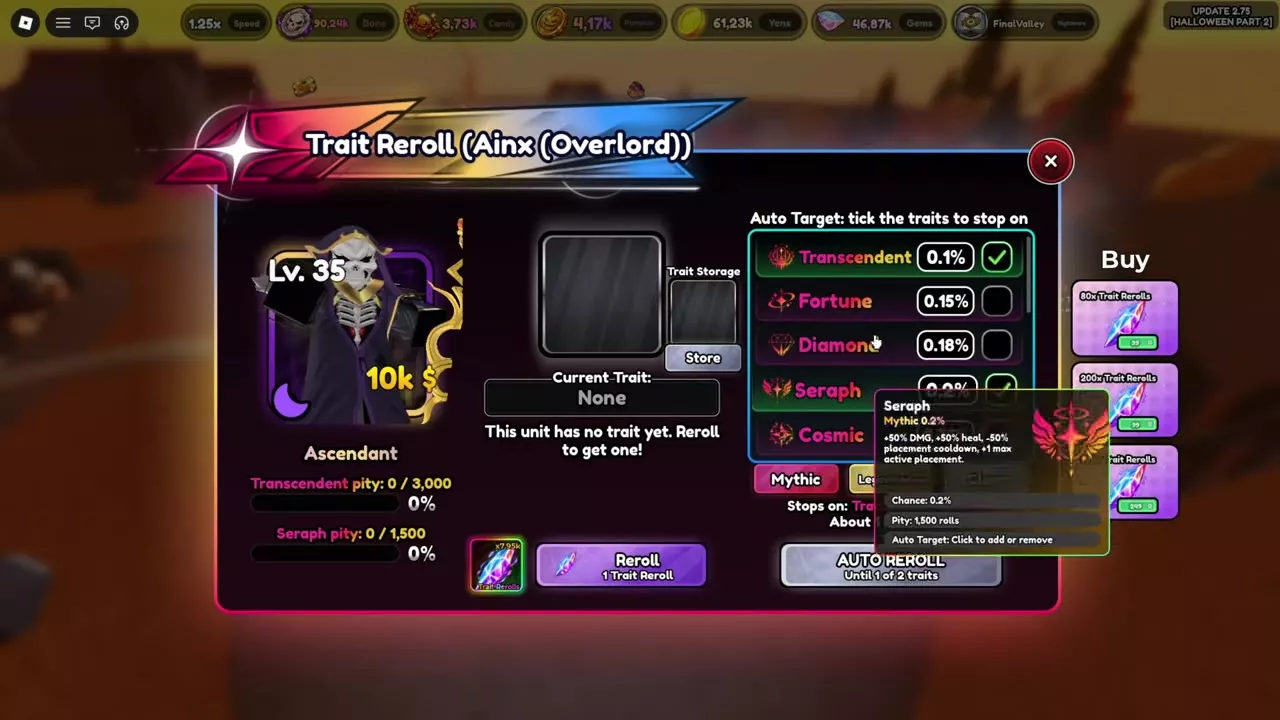
Open Units, select a unit and choose Reroll Trait. Remove it from the field before changing its trait; each attempt costs 1 Trait Reroll. Select Auto Target traits, then start AUTO REROLL to stop on one of them. Use Store to save the current trait and Switch to change between current and stored options. Choose Transcendent for one stronger placement or Seraph for an extra active placement and faster redeployment.
Trait effects and placement
Traits affect damage, healing, range, attack intervals, enemy evasion, income and deployment. Choose according to the unit's role: a larger damage bonus strengthens an individual placement, while additional placements change how many copies you can keep active.
For support units, weigh coverage and deployment needs alongside healing bonuses. For attackers, consider attack speed, critical hits and enemy evasion as well as raw damage. Transcendent and Seraph make this tradeoff especially clear: one concentrates power into a single placement, while the other adds an active placement and shortens placement cooldown.
Trait directory
Compare roll chance, damage and range below. Expand a trait's name for its other bonuses, placement rules and pity threshold.
- Choose Cosmic or Harbinger when enemy evasion is the problem. Both reduce enemies' chance to evade that unit by 30%; Cosmic also adds damage and healing.
- Choose Diamond for damage, range and critical hits. Its attacks have a 25% chance to deal double damage.
- Choose Velocity for a shorter attack interval. Phantom I also reduces SPA, with a smaller reduction.
- Use Money on a unit that earns Yen to increase that unit's Yen earnings. Eagle Eye II favors range, Overlord II favors damage, and Prodigy increases both.
Look up trait chances and combat bonuses.
12 objects
|
|
Mythic | 0.1 % | 325 % From October 25, 2026 | 50 % |
|---|---|---|---|---|
|
A Mythic trait that increases damage, healing and range while limiting deployment to one placement.
TipsAccount for the one-placement limit when choosing Transcendent. Extra Placement does not add another Transcendent placement. |
||||
|
|
Mythic | 0.2 % | 50 % | — |
|
A Mythic trait that increases damage and healing, adds an active placement and reduces placement cooldown.
TipsSeraph reduces the standard two-second downed-placement wait to one second and adds a placement. |
||||
|
|
— | 0.15 % | — | — |
|
A trait available through Trait Reroll and selectable as an automatic stopping target.
|
||||
|
|
Mythic | 0.18 % | 60 % | 15 % |
|
A Mythic trait that increases damage and range and enables critical hits.
|
||||
|
|
Mythic | 0.36 % | 50 % | — |
|
A Mythic trait that increases damage and healing and reduces enemy evasion.
|
||||
|
|
Mythic | 0.8 % | — | — |
|
A Mythic trait that reduces enemies' chance to evade the unit's attacks.
|
||||
|
|
Legendary | 1 % | — | — |
|
A Legendary trait that reduces the unit's attack interval.
|
||||
|
|
— | 15 % | — | — |
|
A trait that reduces the unit's attack interval.
|
||||
|
|
— | 7.5 % | — | 12.5 % |
|
A trait that increases the unit's range. |
||||
|
|
— | 7.5 % | 12.5 % | — |
|
A trait that increases the unit's damage. |
||||
|
|
— | 10 % | — | — |
|
A trait that increases the Yen earned by its unit.
|
||||
|
|
— | 9.99 % | 15 % | 15 % |
|
A trait that increases the unit's damage and range. |
||||
Reroll and set automatic targets
Each attempt consumes 1 Trait Reroll. Remove the selected unit from the field before changing its trait.
- Open Units, select the unit and choose Reroll Trait.
- Click traits under Auto Target to add or remove stopping targets. Use Mythic, Legendary or Clear for quick selection.
- Read the selected target list before starting. Select only results you want to keep: an unselected result does not stop automatic rerolling.
- Press Reroll for one attempt or AUTO REROLL for consecutive attempts.
- Let automatic rerolling stop on a selected trait, or press STOP to end it manually.
When a target is reached, the interface names the trait and reports the number of Trait Rerolls used in that session. The selected unit receives the resulting trait.
Target estimates and pity
The automatic-target estimate applies to the selected set. With Transcendent and Seraph selected, the interface displays approximately one target per 351 rolls. Adding Fortune, Diamond and Cosmic changes that displayed estimate to approximately 106 rolls; adding Harbinger as well changes it to approximately 59 rolls. These estimates describe a hit on any selected target, not a fixed cost to obtain a particular trait.
Read each trait's pity counter separately from that estimate. For example, after Kurumy obtains Transcendent, its Transcendent counter reads 0/3,000 while Seraph reads 338/1,500. The counters track different trait progress.

Store and switch a trait
Use Trait Storage to retain an alternate trait for the selected unit while pursuing another result.
- Select the unit, open Reroll Trait and obtain a trait you want to retain.
- Press Store in Trait Storage. The current trait becomes None, and the saved trait appears beside it with a Switch button.
- Set your next automatic targets and continue rerolling. The stored option remains available while you pursue another current trait.
- Use Switch to change between the current and stored trait.
For a Transcendent/Seraph setup, store the first useful result before pursuing the other. Keeping Seraph active with Transcendent stored gives you an alternate for a single-placement damage or healing role.

Transcendent and Seraph choices
Transcendent: strengthen one placement
Choose Transcendent when one powerful damage dealer or healer serves your plan. It grants +325% damage, +300% healing and +50% range, with a maximum of 1 placement. The +325% damage bonus applies from October 25, 2026.
The Skill Tree's Extra Placement upgrade does not add a placement to a Transcendent unit. Keep that single-placement limit in your deployment plan even after buying the upgrade.
Seraph: add a placement and recover faster
Choose Seraph when the role benefits from more active copies or faster replacement. It grants +50% damage, +50% healing, +1 maximum active placement and a 50% placement-cooldown reduction.
Seraph is a strong choice for support Kurumy and for Chrollo in the Phantom Troupe evolution trial, where the additional placement is useful. Choose it for these deployment benefits rather than comparing damage percentages alone.
Under the standard downed-unit redeployment rule introduced October 25, 2026, Seraph reduces the wait from 2 seconds to 1 second. Watch the countdown on the unit's hotbar slot; other available placements remain usable while the downed placement waits. For automatic recovery, enable Auto Sell Downed Units in Settings > Auto or Units Manager, and enable Auto Play to place the unit again. Selling a downed unit returns no Yen.
Gem Rush's Berserk Golems modifier increases the placement wait by 30% each time a unit goes down, up to a 120% increase. The one-second Seraph wait applies to the standard rule.
If both traits suit different tasks, keep one in Trait Storage and switch according to the role you need.
Unit development
- Use Farming Teams and Support Choices to decide which damage, control, income and support roles your traits need to serve.
- Use Stat Rerolls, Auto Targets and Potential to improve unit stats and set stat-grade targets.
- Browse Anime Nexus RNG Units for unit forms, abilities, growth values and acquisition routes.