
Anime Nexus RNG Guilds, Upgrades and Weekly Activities
Guilds combine shared progression, member bonuses and activities with your guild mates. Use the Guilds menu to manage membership, organize cross-server groups and enter guild challenges.
Open Guilds in the lobby to join a guild or create one with a Guild Ticket. Leaders and Officers invite players through Members. Upgrading from level 25 to 35 costs 500 Guild Upgrade Tokens and expands capacity from 10 to 20 members. Use Squad to summon members across servers, and Week Stage to earn Guild Marks, Guild EXP and time-based chests. The November 9–16, 2026 Tower Clash has ended.
Create, join and manage members
Create a guild
- Have a Guild Ticket ready.
- Open Guilds from the lobby and select Create a guild.
- Use the ticket to found your guild and choose its emblem and color.
Guild names, tags and messages pass through an additional word filter alongside Roblox's filter. Names that break the rules are censored.
Find and join a guild
While you are outside a guild:
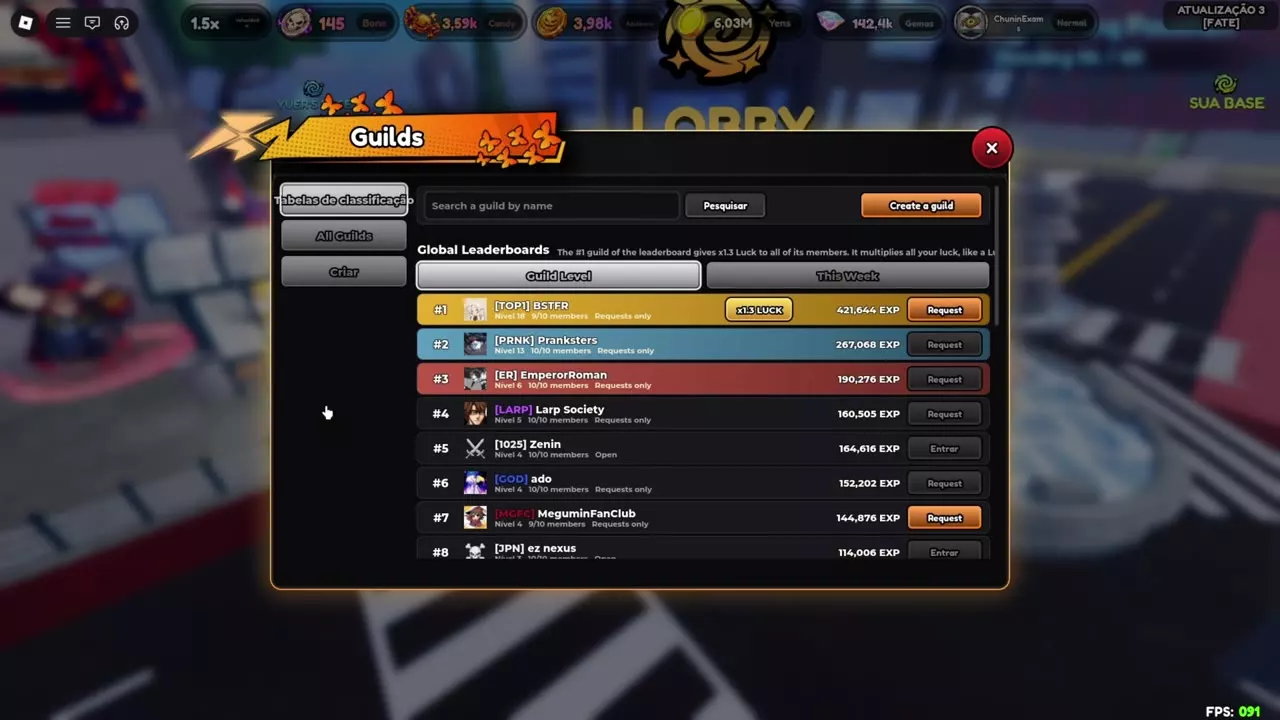
- Open Guilds, then select All Guilds to browse 20 guilds per page. Select Load more for additional entries.
- Search by guild name or browse Global Leaderboards. Switch between Guild Level and This Week to compare standings. Entries show level, member count, joining method and EXP.
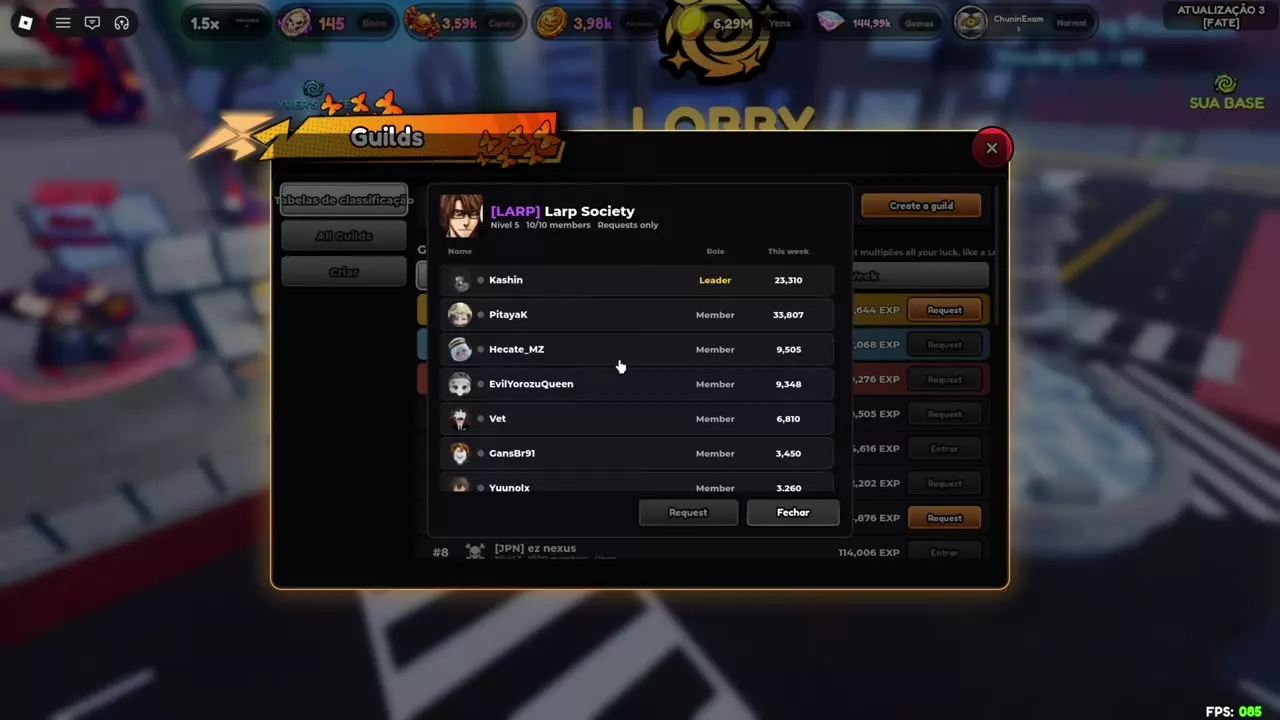
- Select a guild name to inspect its members, roles and individual This week values.
- Use Join for direct entry or Request for a guild that accepts applications.
Check the member count and joining method before choosing a guild: an open guild offers direct entry, while a request-based guild requires an application.
Invitations and member tools
As a Leader or Officer, open Members and invite a player using their Roblox username. Players outside a guild can open Leaderboards and select Accept or Decline on invitations at the top of the tab.
- Select a member's avatar or name to open their profile.
- Use the online indicator to identify members playing on your server or another server. Offline members show how long they have been away.
- Open Chat to talk with guild members across servers, including from the lobby and portals.
- Select Leave Guild and confirm when you want to leave.
Levels, capacity and bonuses
Upgrade costs and member slots
Guilds reach a maximum of level 35. From level 25 onward, each upgrade adds one member slot: capacity grows from 10 members at level 25 to 20 at level 35.
Levels 26–30 cost 40 Guild Upgrade Tokens each; levels 31–35 cost 60 each. Budget 200 tokens to move from level 25 to 30, then another 300 tokens to reach level 35: 500 tokens total.
For recruitment, level 30 provides five additional slots over level 25. The next five slots cost more per upgrade, so plan the token budget around how many members you want to accommodate.
Guild bonuses
Guild progression provides Luck and Gems bonuses. In the November 8 private-server patch, the level 2 reward changes from +3% Luck to +1 Roll on every roll. That reward adds a roll to each roll action.
Every member of the leaderboard's number 1 guild receives ×1.3 Luck. This multiplies all of the player's Luck, like a Luck gamepass, and replaces the original +15% bonus.
Open the Luck panel at the bottom left to inspect the guild-level boost and number 1 guild boost separately. For other ways to prepare your Luck before rolling, see Luck Boosts and Rebirths.
Guilds
- Creation requirement
-
Guild Ticket
- Maximum level
-
35
- Level bonus types
-
Luck and Gems The level 2 bonus changes to +1 Roll on every roll in the November 8 private-server patch.
- Number 1 guild Luck multiplier
-
1.3× (All members of the leaderboard's number 1 guild) Multiplies all of the player's Luck and replaces the original +15% bonus.
- Squad portal wait extension
-
60 seconds per travelling member (Guild members travelling to the host's portal)
- Offers the weekly Colossus activity
- Guild Colossus
- Participates in Guild Tower Clash
- Guild Tower Clash (During the event)
- Provides the Week Stage tab
- Week Stage
| Level / Stage | Extra Rolls per roll | Member capacity | Upgrade cost |
|---|---|---|---|
| Level 2 | 1 Roll (November 8 private-server patch) Replaces the previous +3% Luck bonus.
| — | — |
| Level 25 | — | 10 members
| — |
| Level 26 | — | 11 members
| 40 Guild Upgrade Tokens (Upgrade from level 25)
|
| Level 27 | — | 12 members
| 40 Guild Upgrade Tokens (Upgrade from level 26)
|
| Level 28 | — | 13 members
| 40 Guild Upgrade Tokens (Upgrade from level 27)
|
| Level 29 | — | 14 members
| 40 Guild Upgrade Tokens (Upgrade from level 28)
|
| Level 30 | — | 15 members
| 40 Guild Upgrade Tokens (Upgrade from level 29)
|
| Level 31 | — | 16 members
| 60 Guild Upgrade Tokens (Upgrade from level 30)
|
| Level 32 | — | 17 members
| 60 Guild Upgrade Tokens (Upgrade from level 31)
|
| Level 33 | — | 18 members
| 60 Guild Upgrade Tokens (Upgrade from level 32)
|
| Level 34 | — | 19 members
| 60 Guild Upgrade Tokens (Upgrade from level 33)
|
| Level 35 | — | 20 members
| 60 Guild Upgrade Tokens (Upgrade from level 34)
|
Call a Guild Squad
Open Guilds → Squad to assemble online guild members across servers. The joining flow depends on the activity.
Night of the Undead
- In Squad, press Call Guild for Night of the Undead.
- Online members receive a popup. Have them select Join to enter your party.
- Check Your Party to see who has joined.
- As the host, press Start in Your Party when the group is ready.
Pumpkin Portals and Gate of Babylon
- Press Open Portal to open your bag filtered to the supported portals.
- Pick a portal and choose its Hexes.
- Open the portal to send the guild call.
- Have members select Join to enter your portal directly.
For each guild member travelling to the portal, its waiting period extends by 60 seconds.
Accepting a call
Join takes you from your current server straight to the host's server and into their party or portal. If you accept during a match, your current match stops. Finish the run first if you want to keep playing it; accept the call when you are ready to leave.
Guild Colossus and Tower Clash
Guild Colossus
Guild Colossus is a weekly guild activity with tier-based rewards. Its four reward tiers give 15, 35, 55 and 100 Roll Tickets, respectively, in tier order.
If you claimed a tier before Roll Tickets were added to its rewards, join the game to receive the missing tickets for that claim.
Guild Tower Clash
The November 9–16, 2026 Guild Tower Clash ended at 00:00 UTC on November 16.
During that event, the guild score was the sum of each member's best Guild Tower floor result for the week. Repeated runs by the same member did not accumulate: improving that member's best result increased their contribution, while repeating a lower result added nothing.
This scoring rewards improvements across the roster. Helping another member raise their weekly best contributes to the guild total, just as improving your own best does.
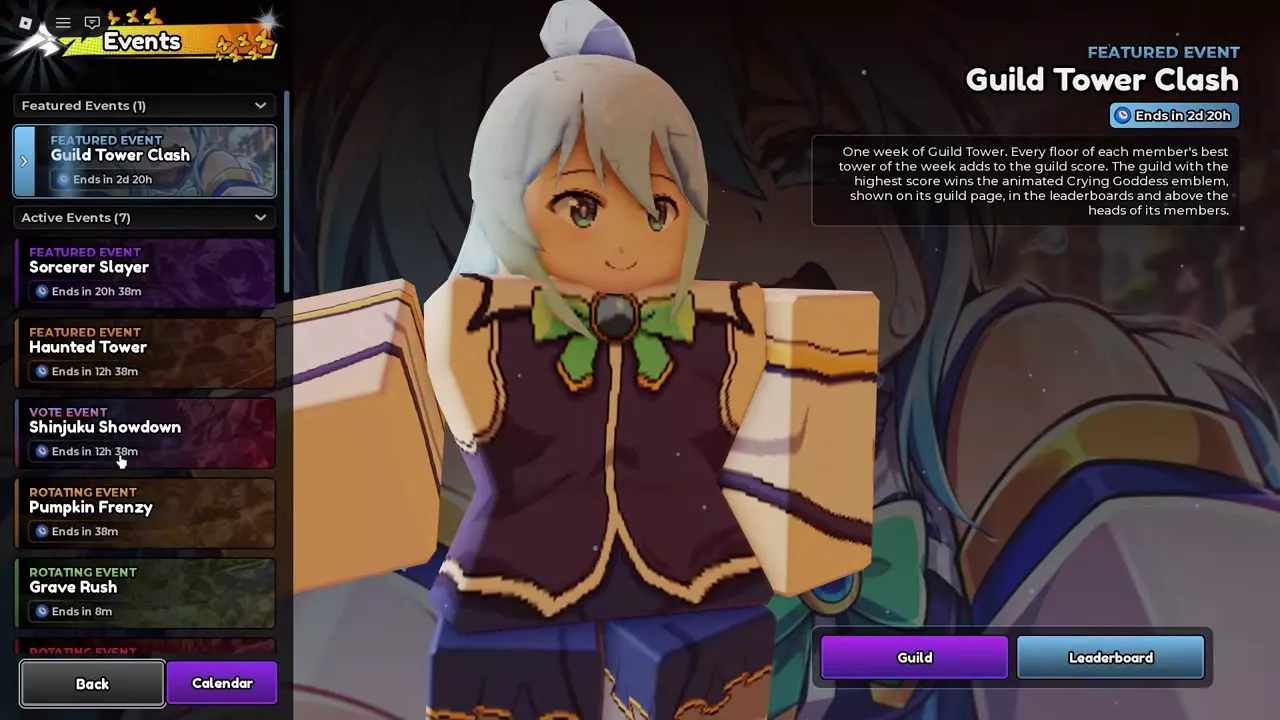
The highest-scoring guild earned the animated Crying Goddess emblem, displayed on the guild page, leaderboard and above members' heads.
The event entry is Events → Guild Tower Clash, with Guild and Leaderboard buttons for the guild interface and standings.
Guild Colossus
- Schedule
-
Weekly
- Roll Ticket rewards
-
15 / 35 / 55 / 100 Roll Tickets (Depends on reward tier) The amounts follow the tier sequence.
- Earlier claim backfill
-
Delivered on joining (A tier was claimed before Roll Tickets were added) The missing Roll Tickets are sent when the player joins the game.
Guild Tower Clash
- Guild score
-
Sum of members' weekly best floors floors (During the event week) Each member contributes their best run of the week; repeated runs from the same member are not accumulated.
- Event start
-
November 9, 2026 (November 2026 event)
- Event end
-
November 16, 2026, 00:00 UTC (November 2026 event)
- Winning guild reward
-
Animated Crying Goddess emblem (Highest-scoring guild) Displayed on the guild page, leaderboard and above members' heads.
Week Stage
Enter and clear the challenge
- Open the Guild window and select Week Stage.
- Choose solo play or play with up to four guild mates.
- Fight six consecutive bosses in the portal world. Each boss calls for a different kind of team.
- Win the stage to receive Guild Marks, Guild EXP and a Time Chest determined by your clear time.
Difficulty increases with player count. Add guild mates whose teams help cover the different bosses; a larger group also faces a tougher challenge. Since clear time determines the chest, choose a group that can handle the bosses efficiently instead of adding players solely to increase group size.
Time Chests and weekly standings
Clear time determines whether you receive a Bronze, Silver, Gold or Spiral Time Chest. After the November 15 balance change, each Gold or Spiral chest gives 1 Cursed Object.
The week's best times earn the Heaven Piercer title. Clearing the stage earns its win rewards; competing for the title also requires a place among the week's best times.
Week Stage
- Consecutive bosses
-
6 bosses Each boss calls for a different kind of team.
- Guild mates you can play with
-
4 guild mates (Group play) The stage also supports solo play.
- Group difficulty
-
Increases with player count
- Win rewards
-
Guild Marks, Guild EXP, Time Chest (Every win) Clear time determines whether the chest is Bronze, Silver, Gold or Spiral.
- Time Chest types
-
Bronze / Silver / Gold / Spiral (Determined by clear time)
- Cursed Object reward
-
1 Cursed Object per chest (Gold or Spiral chest after the November 15 balance change)
- Weekly time reward
-
Heaven Piercer title (The week's best times)
Party modes and currencies
- Use Pumpkin and Babylon Portals to compare portal tiers and progression routes before choosing a portal for your squad.
- Use Night of the Undead Difficulties and Rewards to choose a difficulty and prepare for its survival rules.
- Spend Guild Marks in the Guild Shop and Guild Upgrade Tokens on guild levels. The Guild Shop does not support the multi-purchase feature available in other shops. See Currencies and Where to Use Them for the currency directory.