
Anime Nexus RNG Capsule Rewards, Costs and Bulk Opening
Choose the capsule for your target unit, material or cosmetic, then buy or earn it from its specific source. Open purchased capsules through Items, where you can select how many to use at once.
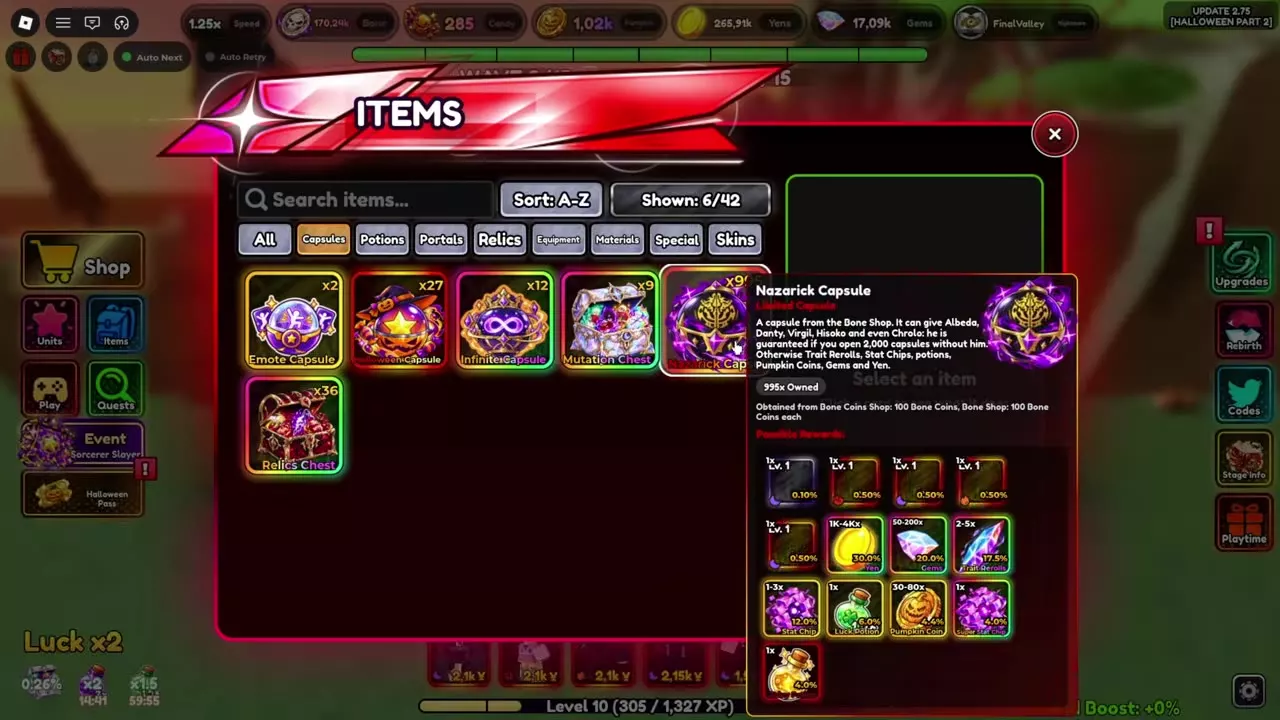
Buy capsules from their respective shops, then open Items → Capsules, select a capsule, adjust the opening amount and press Open. Nazarick, Fate and Enkido Capsules each have a 0.1% target-unit chance and a 2,000-capsule guarantee. Brojo Capsule has a 1% chance for Brojo (Shinjuku). Each capsule has its own reward pool and guarantee.
Unit and reward capsules
For a specific unit, choose Nazarick Capsule for Chrollo, Fate Capsule for Sabar, Enkido Capsule for Enkido, or Brojo Capsule for Brojo (Shinjuku). Sukuno Capsule is the other Showdown faction capsule and shares Brojo Capsule's opening allowance.
Halloween Capsule includes the Black Clover Leaf used to evolve Asto, All Mite x AFO Capsule includes MHA units and materials, and Emote Capsule unlocks an unowned emote.
A target's percentage applies to that reward in that capsule. It does not describe the chance for every other reward, and opening one capsule type does not advance another type's guarantee.
Capsule reward table
Shop prices are per capsule unless a bundle quantity is specified. Fate Capsules come from Defend victories and Enkido's questline; losing the crystal in Defend gives no capsules for that run.
Unit guarantees
| Capsule | Guaranteed target | Guarantee |
|---|---|---|
| Nazarick | Chrollo | 2,000 capsules without Chrollo |
| Fate | Sabar | 2,000th capsule |
| Enkido | Enkido | 2,000th capsule |
Nazarick Capsule also contains Albedo, Danty, Virgil and Hisoka. Its resource amounts apply when the corresponding reward is selected; they are not all awarded with every capsule.
Reward conditions
Halloween Capsule guarantees Black Clover Leaf after 2,000 capsules without obtaining it. Its six skin rewards each have a 1.5% chance per capsule. Choose it for Asto's evolution material or Halloween resources rather than Chrollo.
The All Mite x AFO Relic is limited to one per player. Emote Capsule unlocks one random emote you do not already own.
Brojo and Sukuno Capsules have unlimited Showdown Shop stock, while their descriptions set a combined opening allowance of 500 capsules every four days. Players who have never selected a side can buy both faction capsules. Purchase stock and the opening allowance are separate conditions.
5 objects
| Name | Sources |
|---|---|
|
Bone Shop; Pumpkin Shop; summons
| |
| |
|
U.A. Event
| |
| |
|
Explore Shop; Treasury; Yen Shop
| |
| |
|
Infinite; Treasury; Explore Shop
| |
| |
Solo Leveling Capsule |
Solo Leveling event; Explore Shop
|
5 objects
| Name | Rarity | Source | Target reward |
|---|---|---|---|
Limited
| Bone Shop
| Chrollo
| |
| |||
Limited
| Defend; Enkido quests
| Sabar
| |
| |||
| — | Babylon Treasury; Daily Rewards
| Enkido
| |
| |||
Eternal
| Showdown Shop; Capsule Bundle
| Brojo (Shinjuku)
| |
| |||
| — | Showdown Shop
| — | |
| |||
Buy and open capsules in bulk
Buy capsules
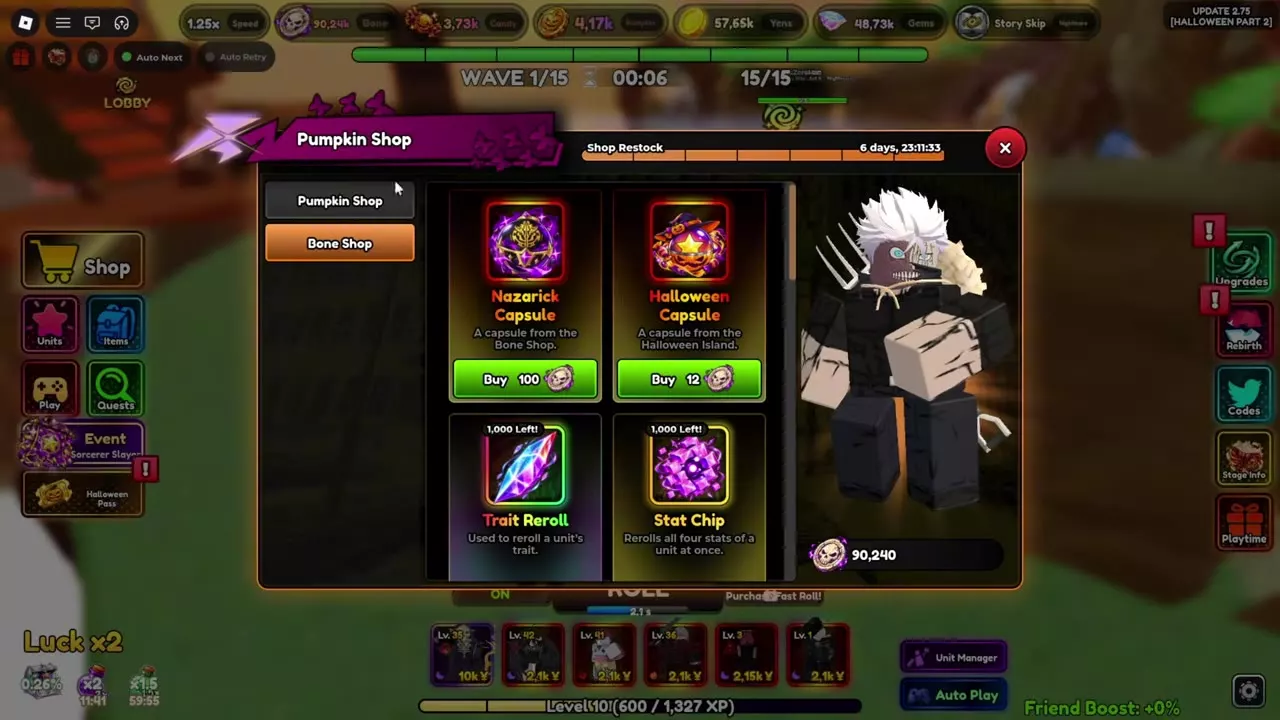
- Open the capsule's shop. Click the top Bone Coins or Pumpkin Coins icon for the Halloween shops, then select Bone Shop or Pumpkin Shop. For Enkido Capsules, talk to Gigglemesh in the lobby and select Treasury. For faction capsules, open Events → Shinjuku Showdown → Showdown Shop.
- Select the capsule and adjust Buy Amount with the quantity controls, slider or Max.
- Check the quantity and total currency cost, then press Confirm. The purchased capsules enter your inventory.
For example, 902 Nazarick Capsules at 100 Bone Coins each cost 90,200 Bone Coins. Buying that quantity with 90,240 Bone Coins leaves 40. Max selects a purchase quantity; it does not open the capsules.
For Explore Shop, press E at Makema's Unit Exploration entrance and select Shop. It sells Emote Capsules for Explore Tokens and an Infinite Capsule bundle containing three capsules. Check whether the selected quantity counts individual capsules or packs before confirming. See shop entrances and currencies for the wider shop directory.
Open your capsules
- Open Items → Capsules.
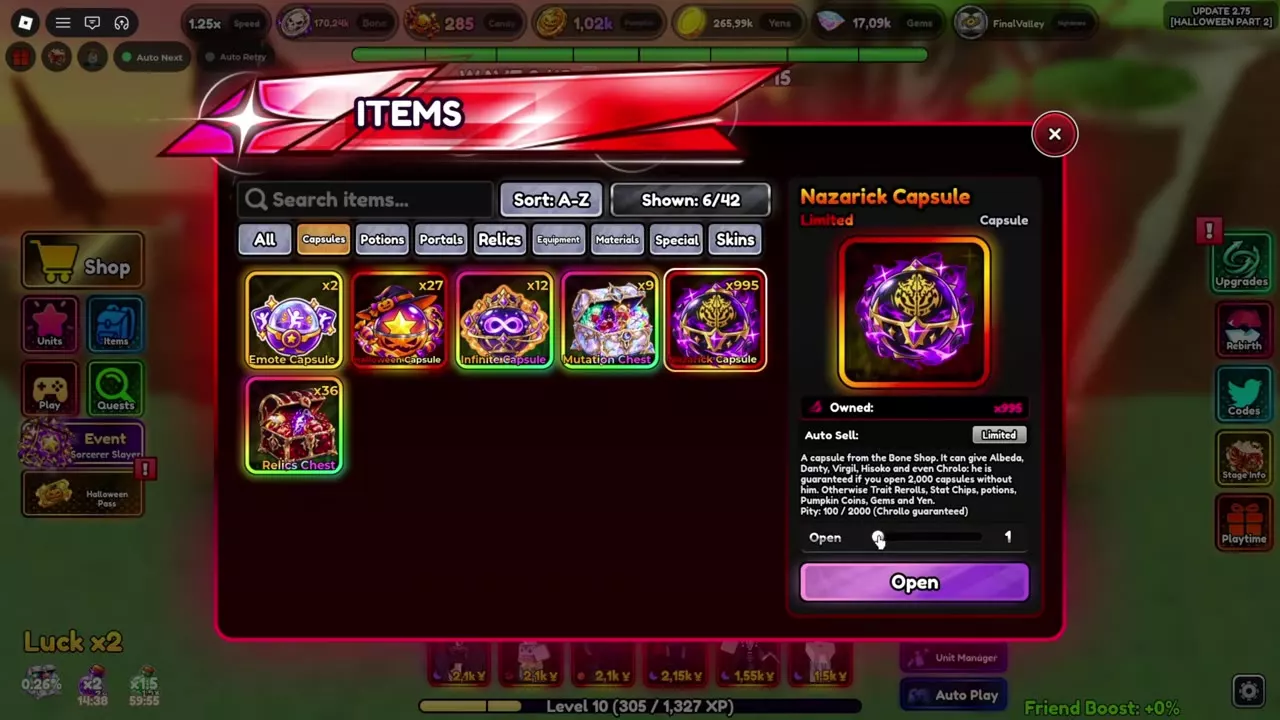
- Select the capsule to view its description, rewards, pity display and available Auto Sell controls.
- Adjust the opening-amount slider to the quantity you want.
- Press Open. The selected capsules are consumed, and the rewards are summarized together.
- Read the reward summary, then click anywhere to dismiss it.
Nazarick Capsules support opening large batches, including 995 at once. Buying and opening are separate actions, so you can purchase capsules first and choose a smaller opening batch afterward.
Set Auto Sell for the capsule you are opening
Use the controls on the selected capsule's panel before opening a batch. Nazarick Capsule has a Limited Auto Sell option; All Mite x AFO Capsule has separate Mythic and Arcane options. Leave the relevant category disabled when you want to keep those units.
Halloween Banner protection applies to its summons: mutated Featured units are kept, and Kurumy is protected from sale. Those are banner rules, so configure capsule sales through the capsule panel. The Auto Sell settings guide explains the separate controls for each acquisition system.
Capsule unit routes
- Chrollo: Start with Nazarick Capsules, then follow the Chrollo evolution and Phantom Troupe trial route for Spider Tattoo and Skill Hunter.
- Sabar: Get the base unit from Fate Capsules or the Fate banner, then follow the Sabar evolution and Black Mud Ritual route to reach Alter.
- Gigglemesh and Enkido: Gigglemesh comes from unit rolls; Enkido comes from Enkido Capsules. Both feed into the Gigglemesh evolution route.
- Brojo: Get Brojo (Shinjuku) from Brojo Capsules, then follow the Brojo to Gokuna route and Sukuno's quest.